In this article, we will explore Databases and Entity Relationship Diagrams (ERD). Although Business Analysts (BAs) do not need a deep technical...
In this article, we will explore Databases and Entity Relationship Diagrams (ERD). Although Business Analysts (BAs) do not need a deep technical understanding of databases, a basic grasp of how data is stored and organized will support effective communication with developers and enhance your analytical capabilities.
1. What is a Database?
A database is a structured collection of data, organized and stored to allow for efficient access, management, and updates. This data can include customer information, products, orders, financial transactions, personnel records, etc.
Databases play a crucial role in the operation of most modern software applications. For example, databases are used to:
- Store customer information in a CRM system.
- Manage products and orders in an e-commerce system.
- Track financial data in an accounting system.
How it works:
When you interact with an application, such as logging into online banking:
- Your information is sent to the database.
- The system validates your login credentials based on data from the database and grants you access to your account.
- Every action you perform on the app, such as transferring money or checking balances, is recorded and updated in the database..
2. Types of Databases:
There are two main types of databases: SQL and NoSQL. These types require specialized software systems for management, known as DBMS (Database Management System):
- Relational Database (RDBMS):
- Data is organized into tables with rows and columns.
- Tables are related to each other via keys.
- Uses Structured Query Language (SQL) to manipulate data.
- Examples of RDBMS__: MySQL, PostgreSQL, SQL Server, Oracle.
- Non-Relational Database (NoSQL Database):
- Data is organized in various ways, not necessarily in tables.
- Can handle diverse data types, including structured, semi-structured, and unstructured data.
- Often used for big data applications requiring high scalability.
- Examples of NoSQL: MongoDB, Cassandra, Redis.
Note: MySQL and SQL Server are types of DBMS, not the database itself. A database is the collection of data, while the DBMS is the tool used to manage that collection.
3. ERD (Entity Relationship Diagram)
An ERD is a type of diagram used to describe the relationships between entities in a database. It helps visualize the data structure and how entities are linked together.
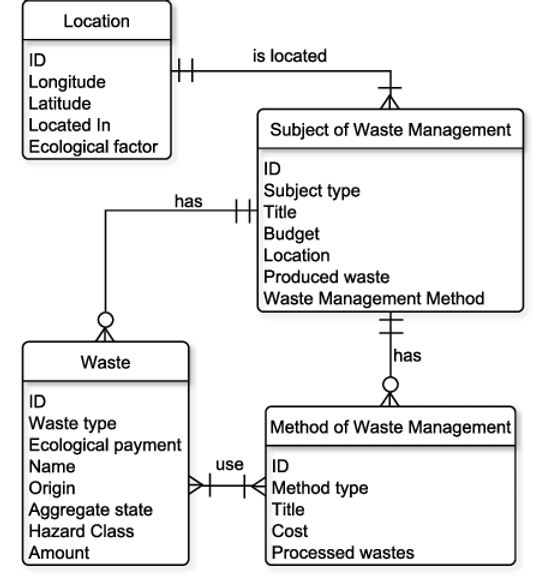
There are two popular types of ERD notations: Chen and Crow’s Foot. In this article, I will only focus on Crow’s Foot ERD, as it is more commonly used by BAs.
Chen ERD source: https://www.researchgate.net
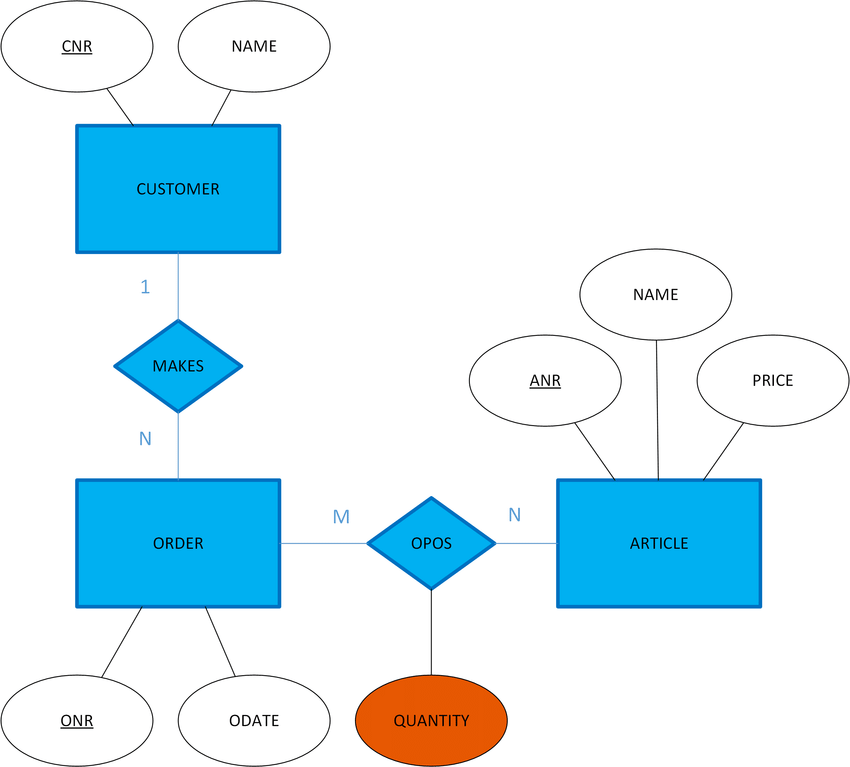
Crow’s foot ERD. Source: https://www.researchgate.net
3. Symbols in ERD
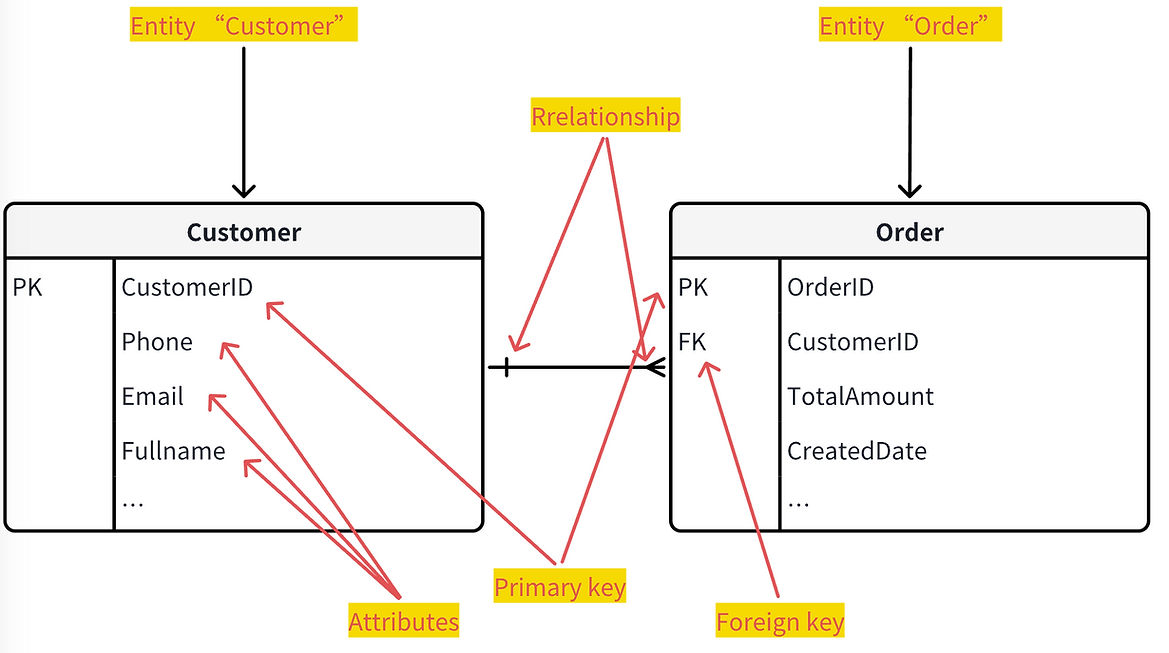
- Entity: Represents an object or concept (mostly) in the real world (e.g., Customer, Product, Order).
- Attribute: Describes the characteristics of an entity (e.g., Name, Address, Price). Apart from general attributes, there are two specific types used to identify and establish relationships between entities:
-
Primary Key (PK):
- An attribute (or set of attributes) used to uniquely identify a specific record in a table.
- Every table in a database must have a Primary Key.
- The Primary Key cannot be duplicated and cannot be empty (null).
- Example: CustomerID, ProductID.
-
Foreign Key (FK):
- An attribute (or set of attributes) in one table that links to the Primary Key of another table, creating a relationship between the two.
- Simply put, the Foreign Key of this table is the Primary Key of that table. (Refer to the Relationships section below for storage details).
- Foreign Keys help ensure data integrity.
- Example: In a "Customer places Order" relationship, the CustomerID (Foreign Key) in the "Order" table links to the CustomerID (Primary Key) in the "Customer" table.
-
Relationship:
- Describes the connection between entities.
- There are multiple types of relationships, but fundamentally we have three: 1-1, 1-n, and n-n
- Example: When a "Customer" places an "Order", the data relationship implies that 1 customer can have multiple orders. Conversely, 1 specific order can only be placed by 1 customer.
-
Ex:
-
4. Explaining Relationships in ERD
Relationship notations (cardinality) in ERD are mixed from two basic forms: 1 (one) and n (many). (When mixed, an "o" symbol may appear to indicate an optional relationship, meaning data might not exist in the related table)
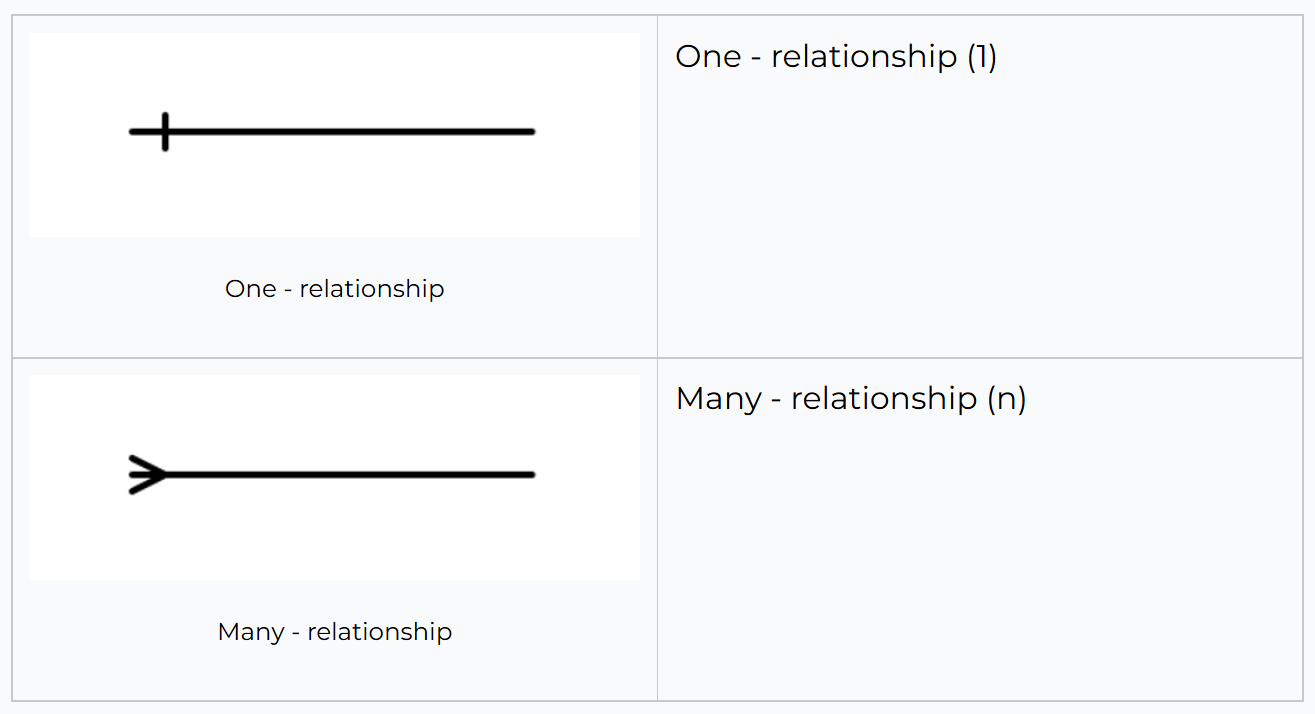
However, as a BA, you don't need to worry too much about complex mixed notations. In practice, I usually just use the basic "1" or "n" when drawing ERDs. These two symbols are sufficient for analyzing and modeling system relationships.
Here are the basic relationships:
- 1-1 (One-to-one):
- One entity can only be linked to one other entity.
- In this case, where to store the Foreign Key depends on the dev team's design. It can be stored in either table.
- Example: A person can only have one ID Card Number. The ProfileID can be stored as a Foreign Key in the ID_Card table, or the ID_Card_Number can be stored in the User_Profile table
- 1-n (One-to-many):
- One entity can be linked to multiple other entities.
- In this case, the Foreign Key must be placed in the "n" table.
- Example: One Customer can have many Bank Accounts.
- Important Note: Theoretically, you could store the keys of the "n" table in the "1" table by converting the "Foreign Key" attribute in the "1" table into a string format (e.g., "Account1, Account2, Account3")
- However, this is NOT recommended in practice because it leads to design, performance, and maintenance issues:
- Complex Data Structure: Storing a list of keys in a single cell makes the data structure messy.
- Query Difficulties: Querying or filtering data based on values inside a string is complex and inefficient compared to using standard Foreign Keys.
- Database Limitations: This limits database features, such as enforcing data integrity constraints.
- Hard to Maintain: As the system grows, maintaining and expanding the database becomes difficult.
- Therefore, for 1-n relationships, the "n" side will always store the key of the "1" side as a Foreign Key.
- n-n (Many-to-many):
- Many entities can be linked to many other entities.
- Example: A Student can join many Classes, and a Class can have many Students.
- Bridge Table (Junction Table): As explained above, directly connecting n-n relationships causes data management issues. Therefore, for n-n relationships, we need to use a Bridge Table to represent the connection.
- The Bridge Table will contain Foreign Keys linking back to the two main tables
- Example: Imagine designing a library app with two entities: "Book" and "Author". One book can have multiple authors, and one author can write multiple books. This is an n-n relationship. You need a bridge table, e.g., Book_Author, containing two Foreign Keys: BookID (linked to Book table) and AuthorID (linked to Author table):
- Book Table: Book Name, Year, Publisher.
- Author Table: Author Name, Nationality, Birth Year
- Book_Author Table: Each row represents a connection between a specific book and a specific author
- Benefits:
- Avoids Data Duplication: You don't have to repeat author details inside every book record.
- Stores Additional Info: You can store extra details about the relationship itself. For example, in the Book_Author table, you can add a "Role" column (Main Author, Co-author, Translator, etc.).
Conclusion:
ERD is a powerful tool that helps BAs visualize data structures and relationships. Understanding ERD allows BAs to communicate effectively with technical stakeholders and make appropriate design decisions.
Lead Solution Architect & BA Coach • 10+ năm kinh nghiệm thiết kế hệ thống