This is the next post in the Use Case and User Story series. In this post, I'll introduce you to the components of a use case and provide a real-world...
This is the next post in the Use Case and User Story series. In this post, I'll introduce you to the components of a use case and provide a real-world example of how to write one.
As mentioned in the previous post, a use case is a detailed description of how a user interacts with a system to achieve a specific goal. It lists the steps, actions, and expected outcomes of the user's interaction with the system
1. Components of a Use Case
- Use Case name: The name of the use case.
- Objective: The purpose of the use case; what it is used for.
- Actors: The participating entities, which can be users, groups of business users, or systems.
- Pre-condition: A specific constraint or condition that must be met for the use case to be executed.
- Trigger: An event or action that initiates the use case.
- Basic flow: The main flow or 'Happy Case' – the steps the actor needs to take to complete the use case.
- Alternative flows: Alternative processing flows or different conditions that may occur during the execution of the main use case.
- Exceptional flows: Exceptional situations, errors, or incidents that occur during the execution of the use case.
- Post condition: The condition the system needs to achieve after completing the use case.
2. Example of Writing a Use Case - According to IIBA
| Use case | Create a Spotify Account. |
|---|---|
| Objective | Allow users to create a new Spotify account to access and use the online music service. |
| Actor | User. |
| Pre-Condition | User does not have an existing Spotify account. |
| Trigger | User clicks the "Sign Up" button on the Spotify website. |
| Basic Flow | 1. User accesses the Spotify registration page. 2. User enters personal information such as name, email, password, date of birth, and gender. 3. User confirms registration. 4. The system validates the information and creates a new account for the user. 5. The system notifies the user of successful registration and redirects them to the Spotify app download page. |
| Alternative Flows | Sign up using a Google or Facebook account. 1. User selects the option to sign up using a Google/Facebook account. 2. The system requests the user to confirm login to their Google/Facebook account. 3. The system validates the information and creates a new account based on the Google/Facebook account. 4. The system notifies the user of successful registration and redirects them to the download page. |
| Exceptional Flow | 1. If the email is not in the correct format, display an error message: "This email is invalid. Make sure it's written like [email protected]." 2. If the email already exists, display an error message: "There's already an account for this email. Log in to your account or sign up with a different email." 3. If the value entered in [Day] is empty or not a valid day of the month, display an error message: "Enter a valid day of the month." 4. If the value in [Year] is empty or < 1900, display an error message: "Enter a valid year." 5. If gender is not selected, display an error message: "Select your gender." |
| Post condition | 1. A new Spotify account is created for the user. 2. Account information is stored in the Spotify system. 3. The user can log in and access Spotify's online music service. |
3. Example of Writing a Use Case - My Way
In reality, there isn't a single standard for describing use cases. When you join a project, you need to understand how the company documents are written and follow their format. If you think the company's document format can be improved, you should suggest your ideas and discuss them with the team or lead, rather than arbitrarily changing the structure or writing style.
Next, I'll show you how I currently describe use cases in my documentation. This approach doesn't separate the three flows: main flow, exceptional flow, and alternative flow. Instead, the alternative flow is separated into a different use case. The main flow and exceptional flow are represented through an activity diagram, and the system's business logic is described through business rules.
| Use case | Create a Spotify Account Using Email. |
|---|---|
| Objective | Allow users to create a new Spotify account to access and use the online music service. |
| Actor | User |
| Pre-Condition | User does not have an existing Spotify account. |
| Trigger | User clicks the "Sign Up" button on the Spotify website. |
Activity Diagram:
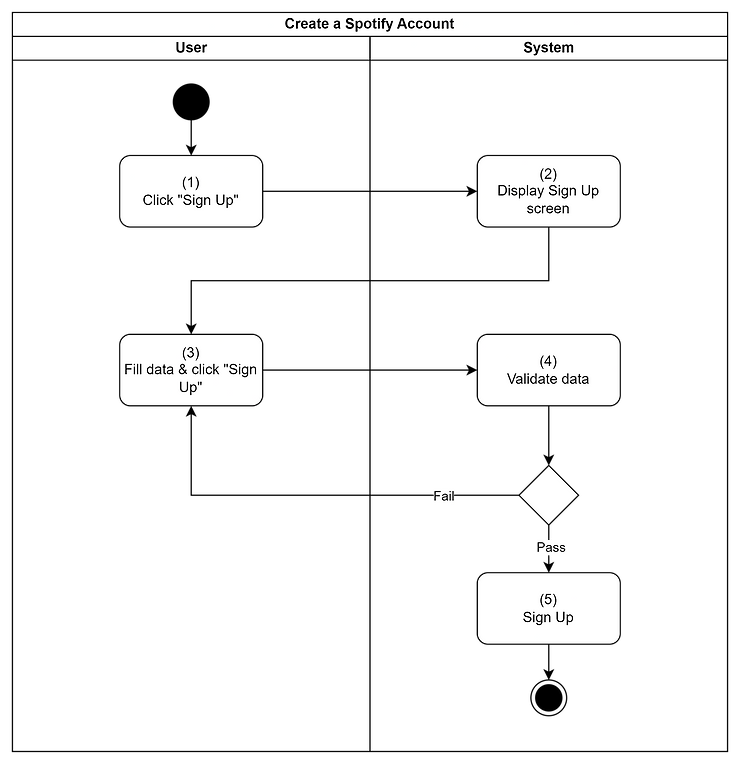
Business Rules:
| Step 2 – Screen Displaying Rules | The system displays the email account registration screen. (In the document, I would use a reference to link the screen design with this rule). |
|---|---|
| Step 4 – Validation Rules | The system will validate the following information: • If the email is not in the correct format, display an error message: "This email is invalid. Make sure it's written like [email protected]." • If the email already exists, display an error message: "There's already an account for this email. Log in to your account or sign up with a different email." • If the value entered in [Day] is empty or not a valid day of the month, display an error message: "Enter a valid day of the month." • If the value in [Year] is empty or < 1900, display an error message: "Enter a valid year." • If gender is not selected, display an error message: "Select your gender." |
| Step 5 – Creation Rules | • The system creates a new account with the information entered by the user. • Set the plan to "Free." • Save the information. • Display a success message. • Redirect the user to the download page. |
I hope this explanation is helpful for you in documenting your projects. See you in the next post about User Stories!